 |
Home | News | Reviews | Gallery | Videos | Calendar | Blogs | Cheats | Demos | Contact Us |  |

|
Product: AirStation Turbo G High Power Wireless Smart Router
Manufacturer: Buffalo Technology Retail Price: From $89.99 USD Date of Availability: Now Available One of the most difficult things to do when setting up a wireless network is choosing the appropriate router or access point to run it off of. There is so much choice these days, and finding a good device is becoming more and more difficult. Different problems plague various devices: for instance, a D-Link router I had earlier would work fine except not letting my PocketPC device connect through wireless. Nothing I could do would make it work; disabling WEP helped at times, but was not something I wanted to do. Having switched to an SMC router, I found the wireless connection problems to be gone; but now anytime I used BitTorrent, it would completely lock the router up and it would need a reset – highly inconvenient if I’m not home and need remote access. Now I have a Linksys WRT5GS, and I’m almost completely happy with it, except when it loses power by accident (say, blown fuse in the house) it will refuse to re-connect to the Internet, and only a re-flashing to the official BIOS, factory default reset, and re-flash back to Talisman will fix it.
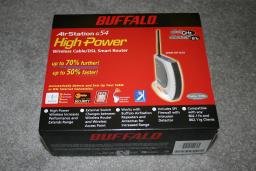
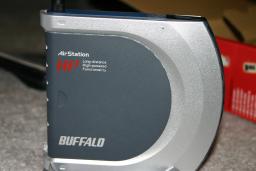
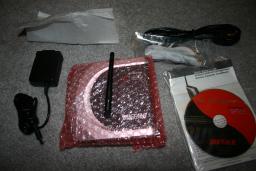
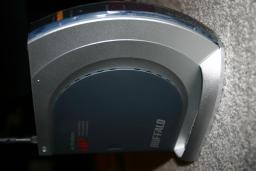
That said, I had a lot of expectations for the Buffalo router going in. As may be derived from the above, I’ve had plenty of difficulties with wireless routers, and I had a certain level of standards that I wanted this router to live up to: and speed was one of the least important factors for me (since I’d rather have a slower but stable router, than a fast but flaky one). I will go into more details later, but the gist of the matter is that I came out happy with all of my tests, hence the high rating. The router came in a nice package with all the necessary cables and equipment. I actually rather liked the network cable it came with – it was flat and long and somehow not the usual round one. The design of the router itself is aesthetically pleasing, as well.
Two of the most noticeable features of this router are High Power and AOSS. High Power, when used with a compatible Buffalo High Power adapter, permits you to exceed the normal range of operation for 802.11g networks and still get very reasonable speeds. In my tests, I was able to go outside of the house and go around the building while maintaining signal; while standard 802.11b equipment barely let me walk down the hallway of the building. AOSS is a technology that simplifies WEP, WPA and all those other acronyms that few actually understand. What it does, in essence, is use an encryption method between your router and a compatible wireless card, so that (a) your connection is safe from being listened to, and (b) your router does not allow others to connect to it, so as to avoid the so-called “war drivers”. Another very useful feature that this router has is a switch that toggles between router mode and access point mode. In many circumstances, you may already have a router (whether you’ve invested into one before or whether your modem happens to already be a router – you wouldn’t want to cascade two routers since it’s a bit overkill). In most units you would have to log into the web interface (which, incidentally, is fairly well laid out on this Buffalo unit) and change settings; but here, you just flick the switch, and you’re done. While on the subject of the web interface, I found it to be very convenient and easy to use. It was missing a few advanced user features (for instance, I couldn’t find a way to forward a range of ports rather than a single port – for instance, if you are running a passive-mode FTP server like glftpd behind the router). The interface has all the usual options, however, such as WEP, MAC address access control and so forth. As well, the interface makes it very easy to set up an Internet connection once connected, which is important considering that many users these days are easily confused by the unnecessarily technical terminology. The Buffalo AirStation G54 WHR-HP-G54 is a very solid unit that performs as expected, delivering a good bang for the buck. I have been unable to crash it using BitTorrent, I have not had any difficulties connecting to it using a 802.11b card in a VAIO laptop, a 802.11g card (Intel 2200BG) in a ECS laptop, a PocketPC and a desktop computer using a USB 802.11g card, and I have had no trouble with the unit when I cut power to it and forced it to reboot. I have no hesitation recommending this device to someone who is looking to build a wireless network in their home and not get into all the technical mumbo-jumbo to do it.
|
Copyright (c) 1998-2009 ~ Game Over Online Incorporated ~ All Rights Reserved
Game Over Online Privacy Policy