 |
Home | News | Reviews | Gallery | Videos | Calendar | Blogs | Cheats | Demos | Contact Us |  |

|
Product: Dragon XG Manufacturer: MGE Company Retail Price: From $189.00 USD Date of Availability: Now Available Computer cases have gone a long way since the simple beige box. New designs, new cooling requirements, new technologies have all driven manufacturers to providing innovative solutions, and simply having a “case” no longer quite cuts it in the enthusiast crowd (what with the LED fans, black lights, UV-sensitive cabling and so on).
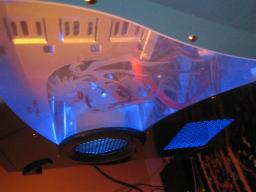
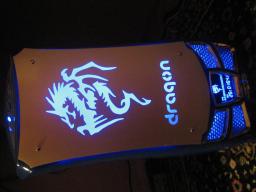
In this review, we’re going to have a look at another offering from MGE (Manufacturer of Great Electronics) – their Dragon XG case aimed at the eXtreme Gamer. The Dragon XG is part of the new generation of cases which focus on showing off your rig. It has a side window which works pretty well for displaying the internals of your computer, and it comes with a few lights: a lighted front door with a dragon logo, a LED fan for the back, a LED fan for the front, and a LED fan for the power supply (which stay off until the power supply heats up to 40 degrees – and then only turning on gradually, which helps keep the noise down). All of them are of a matching blue colour, and the case is available in other colours (and associated fan colours), as well. It also has a matching blue LCD display on the bottom for readouts of various information. Finally, the included intrusion prevention switch is a very useful way of preventing unauthorized access to your computer, if your motherboard supports it.
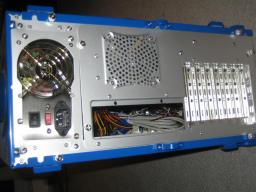
The case comes in a very solid (and cool-looking) black box. When you open the box, you find the case, as well as a plastic cable management attachment that can go on the back of the case, should you so desire. In the case itself, you will find a box with accessories (such as clips for the CD-ROMs and hard drives, a few cable management clips and ties, and an installation manual). The first thing that I really liked about the case was the tool-less aspect of it: taking apart the case is no chore due to the eight thumb screws holding it together (two for each of the doors and four for the motherboard tray). From there you will obviously need tools to attach the motherboard, but not for the drives: it has an innovative way of mounting the drives where you essentially use a plastic rail to connect from outside and “lock” the drive into position. I was a bit skeptical about it, but when done from both sides of the drive, it works pretty well and keeps the drive solidly in. The same goes for the PCI slots: a plastic clip holds all the cards in place securely (though unfortunately it didn’t work for me, since my Asus A8V motherboard came with a USB port assembly which was too wide for the plastic clip to hang on to – so I had to revert to screws, which are thoughtfully provided by MGE). Among other nice features, the case has a set of front ports for USB 2.0, Firewire and microphone / line out. I wish it had a line IN, as well, for the times when I need to input sound into my computer, but that’d be an added bonus.
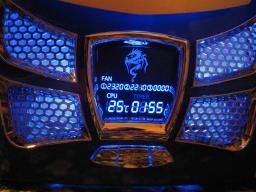
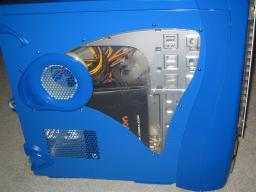
The LCD display is futuristic-looking, albeit somewhat lacking in features. It is capable of displaying fan speeds of up to 3 fans (but it is not capable of controlling their speeds), and it can display temperature from 1 attached sensor. I would have wanted to see a fan speed controller built-in (I once had a much cheaper case that had that feature, though everything else in that case was garbage), and I would’ve wanted to see at least one more sensor. I like the “system uptime” display, though – it shows the amount of time your computer has been powered on. The case also has a side vent, which I’m very happy about, since it allows you to have better cooling for your CPU. It also has a small duct that would supposedly provide more airflow to the CPU. A major design mishap, in my mind, though, is the complete lack of mounts for large fans: you’re basically stuck with the 8cm fans provided. The reason this poses an issue for me is cooling. I don’t want to invest into water cooling, and yet I want to keep my CPU under reasonable operating conditions. Since my previous case was basically a piece of junk, I did some work on it to improve cooling, and it became next to unbeatable in cooling parameters. Having moved the power supply outside the case, I removed a major heat source; and after dremeling a 12cm hole in the side of the case (which was incredibly difficult due to the case having been built in the 1990s out of bulletproof steel, or something like that), I put a 12cm Vantec fan with a duct made out of a bottle of Sprite. It looked totally retro (in a bad sense), but I had stable temperatures of 38 degrees under load – it was worth it. With the Dragon, I no longer have the luxury of putting a 12cm fan on the side without destroying the look (the opening is only good enough for an 8cm fan). Since I threw out the Athlon OEM fan a long time ago (too loud, not enough air flow), I had to construct my own duct connected to the rear fan. This gave me stable temperatures of about 48 degrees, which, while quite a bit higher than before, is still acceptable. Do note that this is my own experience and your temperatures will greatly vary with the equipment you put in – my results are provided for comparative measures only.
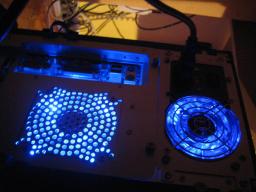
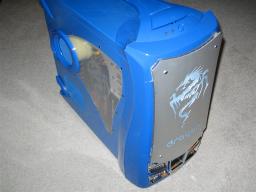
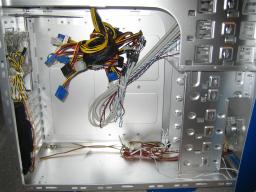
Overall, I have a favourable impression of the Dragon case. I like the lighting (though I really, really wish there was a button or a regulator to turn off/turn down the lighting, for those of us who sleep with the computer on). I also like that the cabling is malleable enough to tuck it away – couple it up with some round IDE cables and you’ll get a very clutter-free system. My only real beef with it is that the LCD display isn’t very useful (though it looks very cool) and that the cooling isn’t what I would expect from a case geared towards eXtreme Gamers: I would expect more mounts for larger fans, and better fan openings (perhaps grilles rather than drilled holes). But the case is promising enough that if you put in a bit of work yourself (as anyone should, these days, to make a true custom system), then you’ll have a pretty impressive rig to show off – and the handle on top of the case makes it easy to carry it to LAN parties to impress people.
|
Copyright (c) 1998-2009 ~ Game Over Online Incorporated ~ All Rights Reserved
Game Over Online Privacy Policy