 |
Home | News | Reviews | Gallery | Videos | Calendar | Blogs | Cheats | Demos | Contact Us |  |

|
Product: HP Media Center 1180n Manufacturer: Hewlett Packard Retail Price: ~$1599 USD Date of Availability: Now Available With the release of Microsoft Windows Media Center Edition 2005 (MCE 2005), HP, one of the initial supporters of the platform, rolls out the next HP Media Center m1180n. A credible computer on its own, this product uses a Pentium 4 550 (3.4Ghz) processor, with 1 GB PC3200 RAM installed, a 250 GB SATA hard disk, an 8x DVD+RW, a DVD ROM, ATI Radeon X300SE and a built in TV tuner to handle recording of television programs. Most of the time, hardware enthusiasts find little to like in brand name systems because of shoddy choice of parts or underpowered components. With this retinue at its command, the HP Media Center m1180n will be appreciated even by that hard to please crowd.
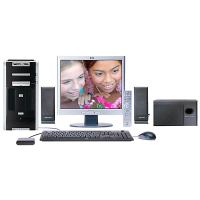

Inside the computer, the operating system has been updated from previous media centers to MCE 2005. This is, in actuality, Windows XP SP2 Professional. MCE 2005 adds a subset interface that has larger fonts, focuses on media, and works better with a remote control. However, if you close the interface, you can continue working with regular Windows applications with a mouse and keyboard. If the television is your primary display, though, the MCE interface may be the only legible one available to you. We also tried pairing television, CRTs and LCD panels together, all of which worked without a hitch. The only caveat is, the MCE interface has to be loaded on one display and stay there. You can’t move the MCE interface from one display to another.
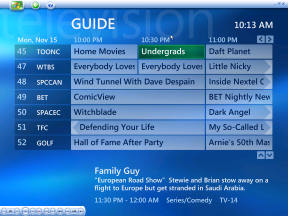
When you first begin MCE 2005, it will walk you through setting up your television source. New to the 2005 edition is Microsoft’s implementation of dual cable tuners. This lets you record television from one channel while you watch another channel. If you think about how a DVD recorder or VCR works, you could only watch and record the same one. The same physics still apply in the MCE world. The guided wizard will also let you set up color, brightness, and sizing issues on a television. For the most part, we were able to skip these as the picture looked fine on the television screen. One additional note, MCE 2005 has stated that it will support HDTV tuners, although the analog cable inputs on the HP Media Center m1180n don’t facilitate that. The last step involves setting up the television guide on the computer. In other services like TiVo, you have to pay a monthly service charge to get an updated guide. In some cases, you couldn’t even run the unit if you didn’t. Microsoft, instead, lets you download the guide for free. The only update fees involved are the electricity bills you need to pay to keep your computer running. We really liked that.
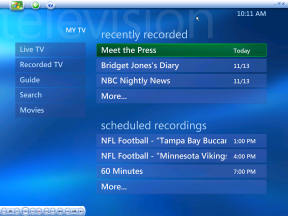

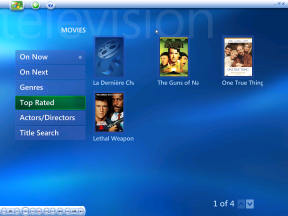
MCE 2005 extends the guide by adding a movies section that will go on the Internet to fetch movie covers as well as director/actor information for any movie displayed on television. This makes it more media-centric and less of a simple PVR solution. In MCE 2005, now you can select movies that are “On Now”, “On Next”, in addition to by genres, release dates and title searches. It helps the MCE setup compete with digital cable offers where movies on demand are becoming the norm. Speaking of movies, MCE 2005 has tie-ins with online content. For example, it can retrieve video clips of sports specially prepared by ESPN. Microsoft’s partnership with CinemaNow through MSN also lets you download full-length movies on to the HP Media Center m1180n. The other way to get media is to record your own. Recording television can be done in two ways. You can schedule the recording in advance and watch the show as it is recording. If you leave about a ten minute buffer, you should be able to get through some hour long television shows without seeing a commercial by using the thirty second skip button on the remote. You can also fast forward and rewind television shows when they are being recorded or when they have already been recorded. In a sample recording of NBC Nightly News, we forwarded to skip a commercial segment only to find Tom Brokaw suddenly on the television. We stopped and MCE 2005 was able to backtrack a few seconds to the end of the commercial. Needless to say, after using many other media players, MCE 2005 felt more intuitive. One more note about the recording: all videos are recorded in DVR-MS format – not MPEG. This is proprietary. In some cases, content providers can also lock a video file, which means you can’t copy DVR-MS from one Windows PC to another for viewing. Microsoft has listened to MCE users though. They and HP have implemented some new ways for people to share media from MCE 2005 computers. The new operating system comes with Windows Media Player 10. And if you choose to setup your audio and video playlists inside this application, you can easily synchronize these with upcoming MCE supported phones, PDAs and the Portable Media Center. The scope of this review won’t cover these other products. Suffice to say, with the HP Media Center m1180n serving as a hub, any docked MCE supported devices can automatically received recorded video. The software will compress the content to a size suitable for display on the portable device. Microsoft is rolling out software for Media Center Extenders. These extenders are set top boxes that will give the same MCE interface (without Windows) and let people from other television sets watch recorded programs or live television based on the HP Media Center m1180n. Initially, only HP and Linksys have extenders for the 2004 holiday season. But Microsoft is leveraging the Xbox too by giving it software and the Media Center remote to turn a regular Xbox into an MCE device. HP has also done some legwork in letting people share media by rolling out the personal media drive (PMD). The PMD is basically an external hard drive. Enthusiasts and consumers may already know about external hard disks but the PMD comes in a svelte silver/titanium case that can be removed from the HP Media Center m1180n. It’s basically a removable hard disk tray but this lets you take the latest recordings to a friend’s place and effectively replaces the old VCR tape trading routine. The unit is more pricy than the regular hard drive though. The HP Media Center m1180n comes with its own software suite besides MCE 2005. It has tools for audio/video editing. That’s important since nine digital media formats for cameras can be used with this computer. A firewire port is available for digital camcorders. It features Intervideo’s WinDVD 5, although MCE 2005 can play DVDs on its own. The only drawback we found with the setup was the omission of Office 2003 and the use of Norton Anti-Virus 2004 instead of 2005. This computer only features Microsoft Works. While it may be a consumer level product, it’s not an inexpensive one. Some version of Office 2003 would have been nice. Ditto for the anti-virus software. Microsoft is clearly putting in a lot of work into MCE 2005. It is now a third generation product with marked improvements from its predecessors. The platform is mature enough to spawn portable and extender accessory products as well as make inroads with the Xbox. It even integrates with MSN Messenger. Although, the HP Media Center m1180n is more PC looking than the newest HP media center devices (like HP’s Z540 or Z545B), it is quiet enough not to be noticed in a living room. You definitely won’t notice it when there is a movie or television on. From a PVR standpoint, the picture quality may not match cable/satellite provider set top boxes or the ubiquitous TiVo, but the interface is by far the easiest to use. Microsoft’s forte is truly software and it shows in this department. Initially, MCE devices were meant for niche markets like enthusiasts, dorm room students who can benefit from a television/computer combination and bachelors who don’t have more than one television in their homes. This isn’t true anymore. It used to be a bit on the pricy side. It still is. But HP may soon be facing MCE price competition from smaller retail manufacturers. Ultimately, with the HP Media Center m1180n, we can see this fitting into a family home without any caveats or reservations. That this product is also a powerful PC workstation is a bonus.
|
| Rating •••••90%••••• |
Copyright (c) 1998-2009 ~ Game Over Online Incorporated ~ All Rights Reserved
Game Over Online Privacy Policy